Herbalife Nutrition is proud to sponsor the Marina Run 2018for the second consecutive year! Come, join us in kicking off our resolution for a healthy 2018 at the Marina Run on 10th February (Saturday) – enjoying the picturesque Marina Bay area, reliving history through the iconic landmarks, and delighting in the glory of the Gardens by the Bay!
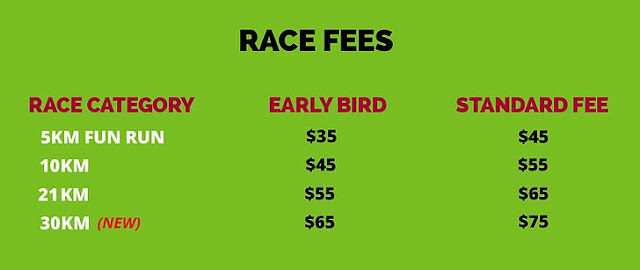
Kick start your new year with the first 5km Fun Run, 10km & 21km Half Marathon and 30km (New Race Category) of 2018! The Herbalife Marina Run features all of the beauty and grandeur the Marina Bay area has to offer. Your unforgettable journey will take you from the waterfront communities, over the Marina Barrage, past iconic landmarks and through beautiful Gardens. Whether you're an advanced runner or just looking for a scenic jog, The Herbalife Marina Run promises a great time for participants of all speeds.
All finisher of Herbalife Marina Run 10km,21km and 30kmwill receive a Brooks running singlet, finisher medal and Brooks finisher T-shirt. 5km Fun Run participants will each receive an event T-shirt, blinker lights and a finisher medal.
Over 100 Awesome Brands To Choose From Personal Favorite: Ezbuy, Zalora, Chocolate Origin & Standing Sushi Bar
Visit Their Official Facebook PageHere Visit Their Official WebsiteHere
0. Purchase A Physical Copy of the Gift Card On Their Official WebsiteHere
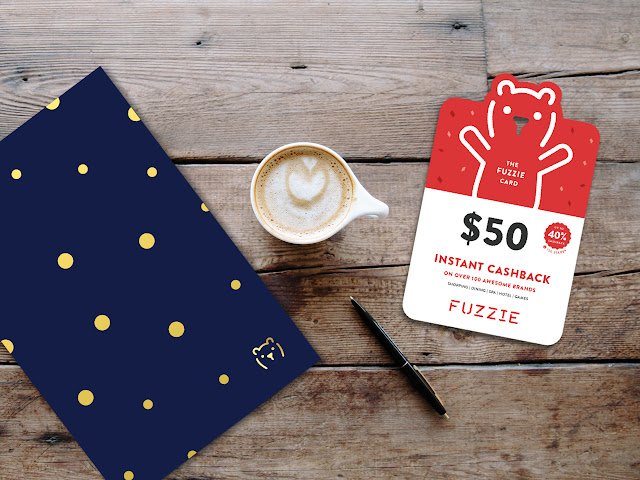
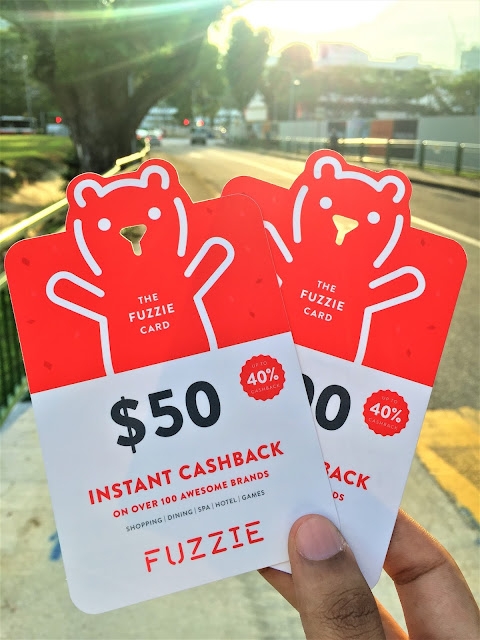
$30, $50 & $100Fuzzie Gift Cards Are Available For Purchase!
Choose between these 2 different colors Deep Blue or Fuzzie Red And Personalise Your Gift With A Special Message
The Envelope is made from Premium RJ Maple Bright and is completed with dashes of sparkling gold foil to captivate the eyes.
1. Download the Fuzzie Appby clicking on the tabs above!
2. Click on the Fuzzie App after your download has completed!
2. For the ease of convenience, I've placed my icon in the same folder as the brands that I frequently patronise using the gift cards that I bought from Fuzzie
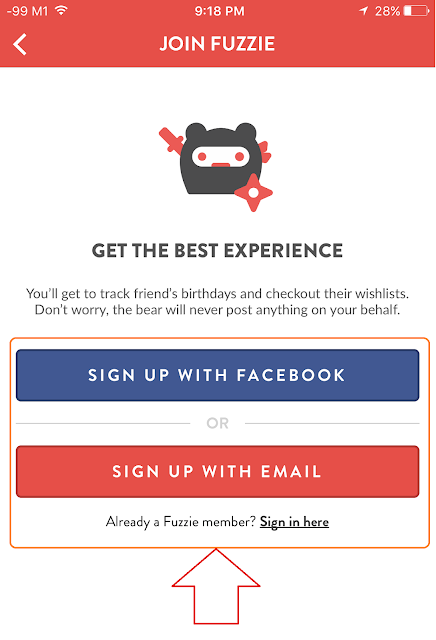
3. Proceed on by pressing on the "Join Fuzzie Tab"
4. Sign yourself up either using your Facebook account or your personal e-mail address
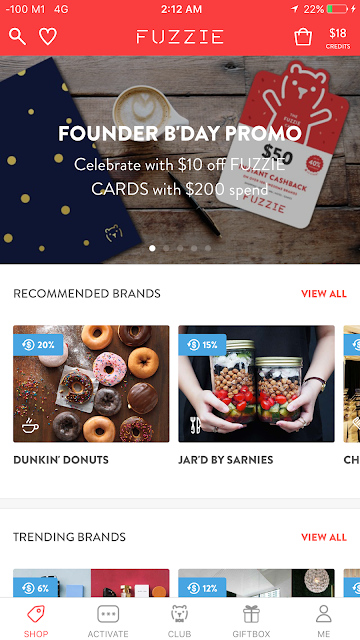
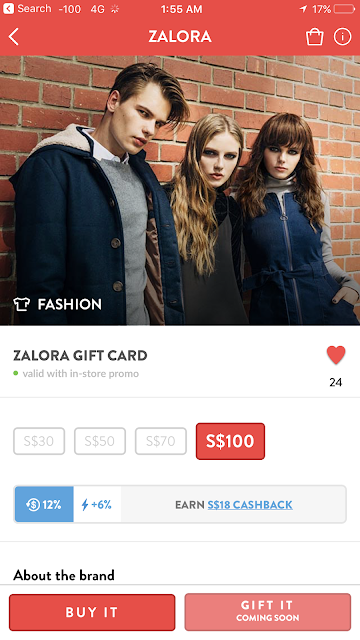
4. Search for your favorite brand such as (e.g. "Zalora")
4. Choose the $100 gift card that earns you a cash back of $18
12% Original Cashback + 6% Power up (Power Upsmay be activated via a given code that lasts for 24 hoursor may be available as an offer fora limited period of time)
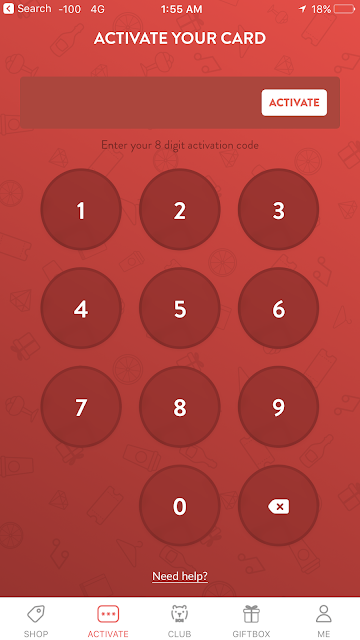
Power Up Card may sometimes be given to you via SMS after you made a purchase & must be activated within 5 days to be entitled to a booster that increases your cashback by up to 2X. This can 8-digit activation code can be shared with3 other friends!
ADDITIONAL CREDITS USING THIS ACTIVATION CODE: 51058086 For my fellow readers, who are first-time users who just signed up for a Fuzzie account, you are entitled to an additional $10 credit. Simply apply "51058086" in your Fuzzie Mobile Application, under the "Activate Tab", to be entitled to this promotion. This code is valid for "100 new-user redemptions" only & must be activated by 30th June 2017!
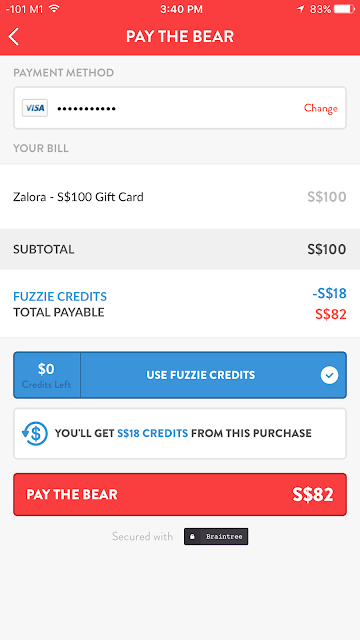
4. Make payment for the $100 gift card after entering your credit card detailsUse any outstanding Fuzzie creditsthat you have obtained from your previous purchase to offsetyour current one!
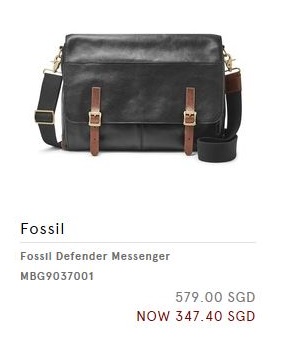
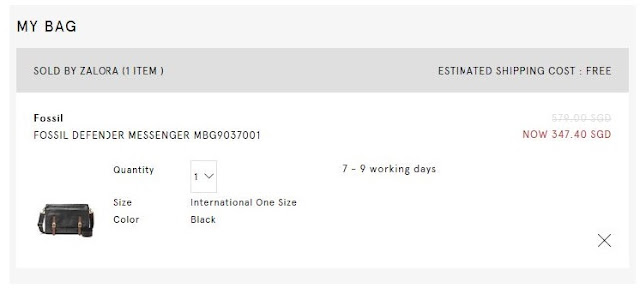
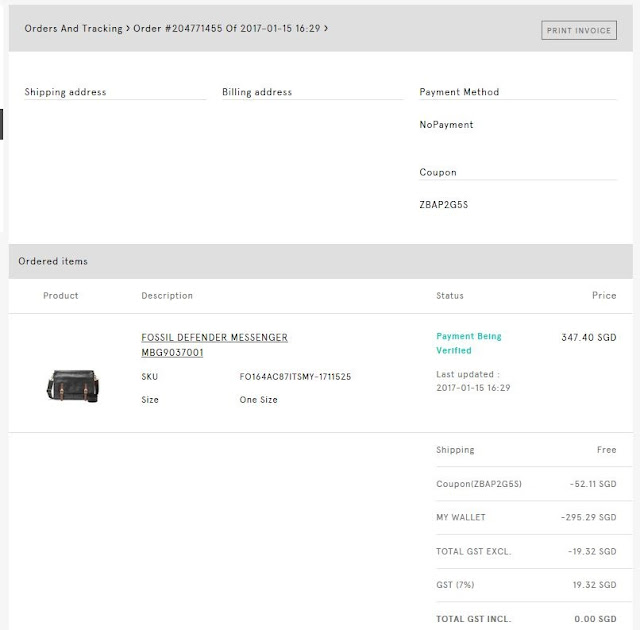
5. For example, I would like to purchase a Fossil Bag at Zalora that is also having the same 40% discount at their store. I would definitely head online to purchase it due to the amount of cash I would save online instead.
a. Before making a purchase outside, it would be wise to check online at "Zalora's Website/iPhone App/Android App" before making a rash decision to purchase the bag on the spot!
b. If the price is exactly same as the one found in the shop, proceed home to do a thorough calculation like I did to save as much money as you can. This is indeed the right way to handle such a situation to prevent any impulse purchase, especially if you're a student like me, who works part-time to cover my own personal expenses.
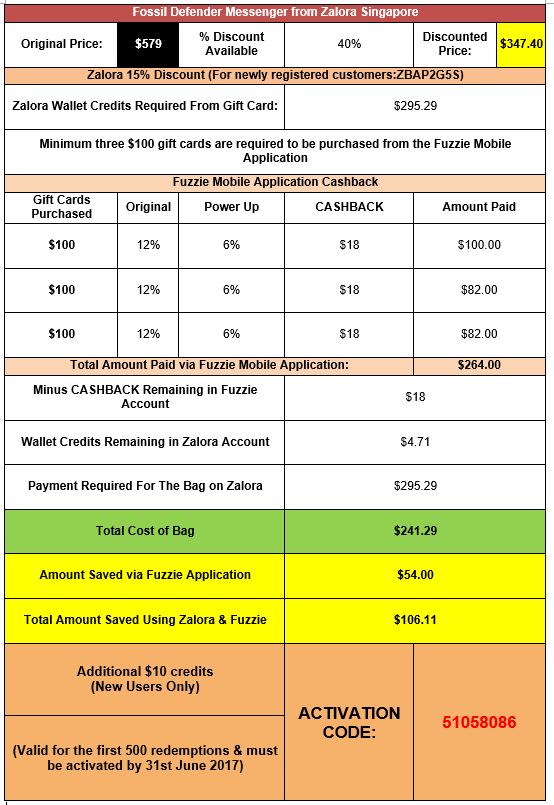
c. Do a breakdown like I did on google sheets, which can also be found here
d. Purchase 3Zalora gift cardsfrom Fuzzie Mobile Application as mentioned in the breakdown provided
e. Redeem the gift cards via the "My Giftbox Tab"
f. Copy the code from each individual card
g. Paste the "gift card code" into the text box provided in the "Zalora's My Wallet Tab" & press the "Add Credit" button.
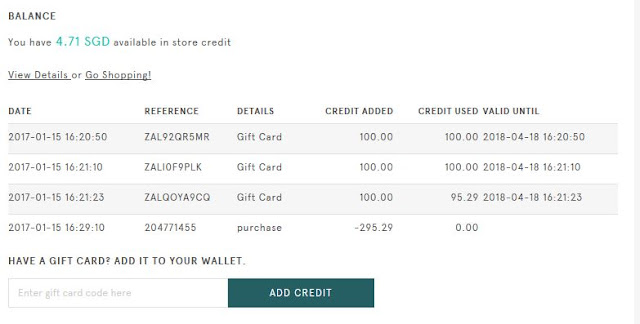
h. Wallet Balance: $300.00, after three gift cards were applied
i. Add the item to your bag to cart out the item!
j. At the top right-hand corner of the page, apply the code "ZBAP2G5S" in the text box provided
k. After applying the code "ZBAP2G5S", you will be entitled 15% off your very first purchase!
l. Take note of the following: Your item takes about "7-9 days" to arrive!
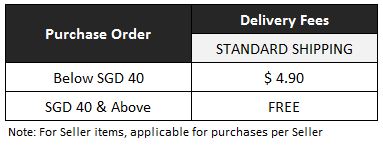
Standard Shipping is FREE above SGD$40 & Above & SGD$4.90 will be charged for orders below SGD$40
Wallet Credits will automatically be applied on CHECKOUT
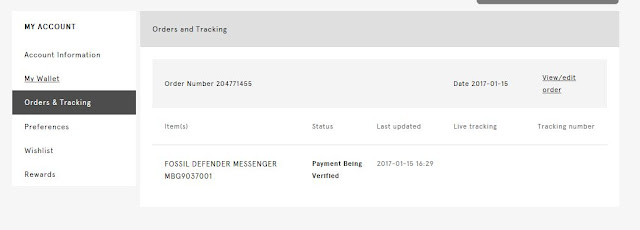
m. Payment will be verified & order will be sent out immediately once payment has been received!
TADAH, we saved $54 using the Fuzzie Mobile Application & a total of $106.11 (inclusive of the 15% Zalora Discount Code).
n. Lastly, I'm left with SGD$4.71 in my wallet, which can be kept and used for future purchases in Zalora!
Latest Addition to Windows Family
Windows 10 : The New Beginning
Already reserved?
Your free upgraded is on its way. Your notification to upgrade could come as soon as a few days or weeks. And you can always check your upgrade status in the Get Windows 10 app.
Official Release Date
Windows 10 Free Upgrade
Wednesday, 29th July 2015
Free Upgrade Till 29th July 2016
Upgrading to Windows 10 is easy for customers running a Genuine Windows 7 or Windows 8.1 PC or tablet.
Starting Wednesday, 29th July 2015, people who reserved their upgrade to Windows 10 will be notified in waves when their upgrade is ready to be installed.
For Business Customers, Windows 10 is available to start deploying within their work environments, and starting Aug. 1, organizations that have volume licensing can upgrade to Windows 10 Enterprise and Windows 10 Education.
Corlissa & I Love Windows 10
You Should Get Yours Today
Windows 10 Luminous Artwork
Amazing Event Held @ 72-13
Mohamed Sultan Rd
Singapore 239007
Some of You May Still Ask This Question!
Is Windows 10 Upgrade Free?
You May Think Now A These Days Such Good Stuff Is Too Good To Be True Right? But Yes, it’s free. This is a full version of Windows, not a trial or introductory version. It is available for a limited time: you have until July 29th, 2016to take advantage of this offer.
To snap a Desktop Window, left-click its window title bar, hold your mouse down, and then drag it to either the left or right edges of your screen. From there, you’ll be able to see a transparent overlay appear, showing you where the window will be placed. Release your Mouse Button to Snap the Window there.
2X2 Grid of Snap Assist
Superbly Good Way of Multi-Tasking You don’t actually have to wait — you can just quickly drag-and-drop a window’s title bar to either edge of your screen to snap it. This part of the process also works on Both Windows 7 and 8.
You can also use keyboard shortcuts instead. The Windows Key + Left / Right / Up / Down keyboard shortcuts can be combined to snap a window into a quadrant of your screen.
For example, press Windows Key + Leftto snap a window into the left half of your screen, then press Windows Key + Up to snap it into the top-left quadrant.
Windows Can Be of Different Sizes
Need Not Always Have To Be A 2X2 Grid
Do Great Things With Windows 10 Intuitive Design That's Superbly Amazing
1. Buy a new device with Windows 10 already on it, or a new Windows 8.1 device and upgrade it to Windows 10 for Free.
2. Upgrade your existing Windows 7 or Windows 8/8.1 PC for Free.
*Not every device will run every feature of Windows 10.*
Be sure to check with your manufacturer before purchasing. Additional details on upgrade qualifications are below and on the Windows 10 specifications page.
Whether Your Motherboard or Graphics CardsAre Compatible
Reserve Your Copy
Windows 10 Upgrade Icon @ Bottom Right
Corner of The Screen
1. Don't see the Windows 10 icon? First, try running Windows Update and install any available required and recommended updates for your existing Windows 7or Windows 8 PC. Still don’t see the icon, Click here.
Note: This free Windows 10 Upgrade is available for PCs and tablets; the free Windows 10 Mobile Upgrade will be available for most phones starting later this year.
Windows 10 Upgrade
May Take A While Before You Can Upgrade
Lucky Me - I Managed to Install It After you have reserved, you are in the queue for your upgrade. Watch out for your notification from the Get Windows 10 app to arrive in the coming days or weeks. At that point, you can Upgrade Immediately or pick a time that works for you. However There Are Some Workabouts
Do Take A Look At The Following Links
Take Note!
If You Encounter Certain Problems Or The Wait For Windows 10 Becomes Too Long
Based on Personal Experience
Ensure Your Computer Is Always Up-To-Date
1. Always Ensure That AllWindows Updates AreDownloaded& Installed As Mentioned Above.
2. From My Experience, There Is A Specific Update Pack For Windows 10 That Needs To Be Downloded Before Your Computer Can Be Upgraded.
Clear The Entire Download Folder
To Remove Any Corrupted Installation Files
3. If certain upgrades cannot be installed or you are stuck in a update loop, navigate to "C:\Windows\SoftwareDistribution\Download" (Change the Letter "C" to the given Alphabet for the Main Local Hard Drive) and delete all the files within theDownload Folder.
4. This should give you something like a Clean Statewith Windows Update.
Search For "Windows Update"
Proceed Forward By Running It
5. Next, open up the Windows Update Application by hitting the Windows keyand simply searching for "Windows Update". Hit enter to launch the app.
6. While Windows Update loads, open the command prompt by hitting the Windows key again to Search for "CMD.exe".
Run Command Prompt
With Administrator Rights
7. While Holding "Control" & "Shift", Press Enter The Moment You See It Appearing in The Search Bar. (This Ensures That The Application Will Be Running As A Administrator)
Command Prompt
With Administrator Rights
8. Once the Window opens, type in “wuauclt.exe /updatenow” (Omitting The Inverted Commas).
Windows Upgrade via Windows Update
Checking Requirements Downloading Windows 10 OS
9. Somehow, It has been said that by also doing this, you may even skip the queue of downloading Windows 10 & Instead of Just Trying To Fix YourWindows Update ErrorsYou'll End Up Installing Windows 10 Straight Away.
10. Alternatively, if the method above in Step 3 fails, try downloading & installing the other updates manually by searching for the Specific Update Package that could not be installed properly.